Skip to content
Rimeo

Tools for your DJ library

Free checkers that run right in your browser, and everything the Rimeo app does with the DJ library on your own computer.

Free in your browser

Fake lossless checker

Drop a FLAC, WAV, AIFF or ALAC file and see if it is real lossless or an upscaled MP3. Your browser draws the spectrogram and finds where the sound stops. The file is never uploaded.

  • Free
  • Any browser
  • Nothing to install
The checker result for an AIFF file: Looks like real lossless, with the spectrogram of the whole track

Rekordbox library checker

Is your USB stick or your Rekordbox library damaged, and can it be repaired? Pick the USB drive or the master.db file and your browser checks it in a few seconds. Nothing is uploaded and nothing is changed.

  • Free
  • Chrome or Edge
  • Nothing to install

In the Rimeo app

Rimeo runs on the Mac or PC that holds your Rekordbox DJ library and puts it on your phone and in any browser. Here is everything it does with it.

Your DJ library on your phone and in any browser

Rimeo reads your Rekordbox DJ library on your computer and streams it to the Rimeo iPhone app or any browser. Nothing gets uploaded. The music plays straight from your own computer.

  • Your playlists and folders as you built them in Rekordbox, with BPM, key, genre and artwork.
  • Search the whole DJ library by title, artist or key.
  • A player with a waveform, and lock-screen controls on iPhone.
  • iPad, Android and any computer play it in the browser.
  • iPhone app
  • Any browser

The Rimeo app runs on the Mac or Windows PC that holds your DJ library: macOS 12 or later, Windows 10 or 11.

The Rimeo app on the computer and the same DJ library on the phone

Sync to Rekordbox: build playlists on your phone

Put a playlist together on your phone and it lands in your real Rekordbox library, with the same name, folder and track order. Nothing to export or import.

  • A real playlist in Rekordbox, not a file to drag in.
  • Backed up first. Rimeo saves a copy of your Rekordbox library before every write and keeps the last five on your computer.
  • Safe to run again. Rimeo sends only what changed, so nothing doubles.
  • Keep editing on the phone. The playlist in Rekordbox ends up exactly as you left it in Rimeo.
  • iPhone app
  • Phone browser

Rimeo writes to Rekordbox from an Apple Silicon Mac or a Windows PC.

A playlist built on the phone syncing into Rekordbox

Similar Tracks: your next track, from your own DJ library

Long-press any track to see what goes with it, or open a playlist to see what it is missing. The picks come from your own sets and playlists.

  • From any track. Long-press it in the collection, a playlist or search and choose Similar Tracks.
  • Inside a playlist. Recommended sits under your tracks, and + adds a pick in one tap.
  • A reason for every pick. Key, BPM and what it shares with the playlist.
  • Past your usual rotation. Tracks you have never played get a turn too.
  • iPhone app
  • Any browser
Long-press on a track, then the Similar Tracks list

Offline on iPhone: play with no signal

Download a track or a whole playlist while your computer is on. After that it plays from your iPhone, with the computer off and no signal.

  • One tap for a track, one for a whole playlist.
  • The original file lands on your iPhone, not a lighter copy.
  • The full player with artwork and waveform works offline too.
  • Yours until you delete them. Cache cleanup never touches downloads.
  • iPhone app

Offline is in the iPhone app. The browser player streams only.

The playlist menu on the iPhone: download the playlist for offline

Pulse: your set history, read back to you

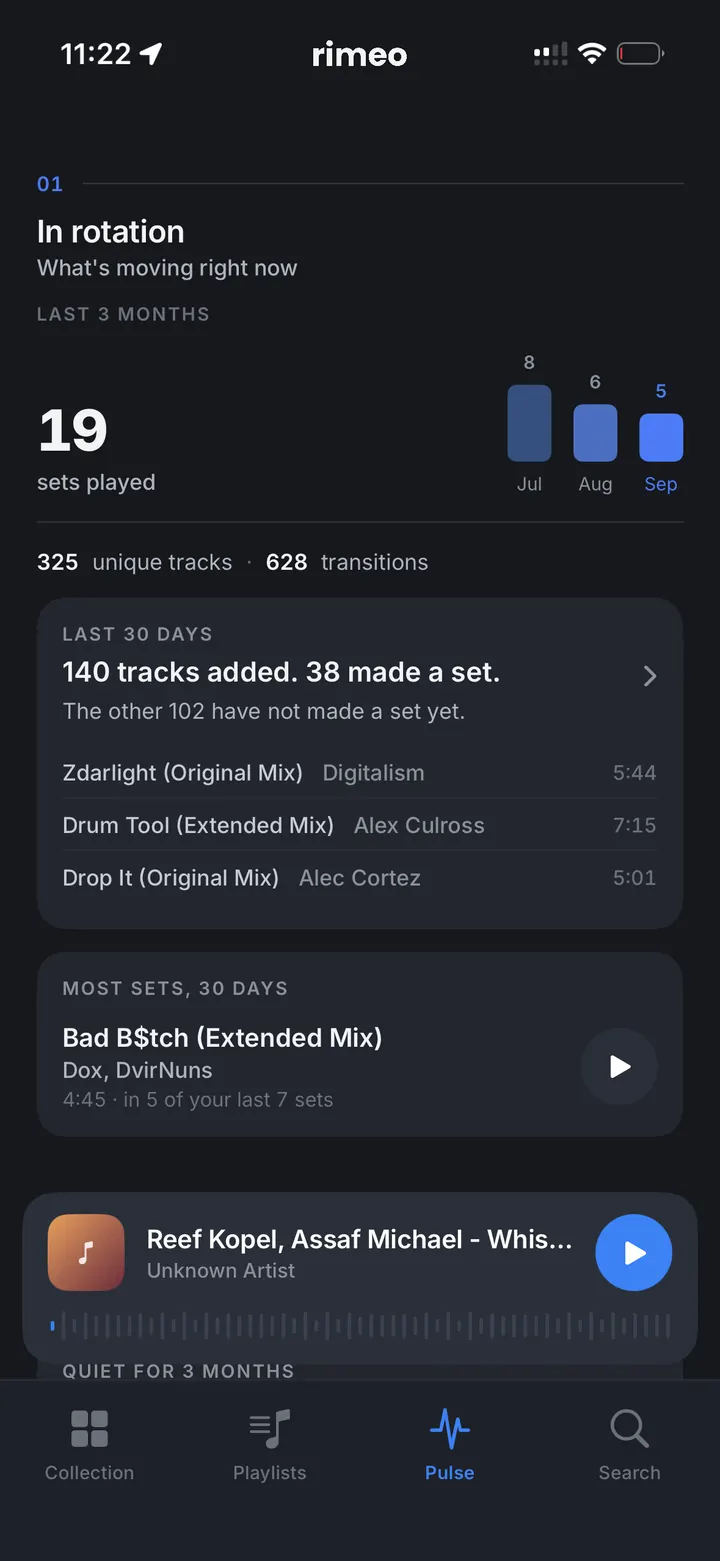
Rekordbox already logs every night you play. Pulse glues those sessions back into sets and counts what is really happening in your DJ library.

  • The year so far. Days since your last set, sets this year, your track of the year and your busiest month.
  • Rotation core. The few tracks that make up half of everything you put in a set.
  • Sitting idle. Tracks quiet for three months, played in one set, or never played in a set at all.
  • Cleanup. Tracks with no key, BPM or genre, possible duplicates and tracks in no playlist.
  • iPhone app
  • Mac app

Counted from the DJ library your computer already shares. Pulse never changes your Rekordbox library.

Pulse on the iPhone: sets played in the last three months, tracks added in the last 30 days and how many made a set

Stems: vocals, drums, bass and the rest from any track

Pick a track from your DJ library or drop a file. Rimeo splits it on your computer, so the track never leaves it.

  • Choose how to split. Fast, Best for vocals or Best for all stems. The app shows how long it will take before you start.
  • Mix. Mute or solo any part and hear the result right away.
  • Export. The mix or each stem as 24-bit WAV.
  • Add to Rekordbox in one click.
  • Mac app
  • Windows app

macOS 13.4 or later on Intel, 14 or later on Apple Silicon. Windows 10 or 11, 64-bit.

The Stems mixer in the Rimeo app: vocals, drums, bass and other on separate faders

Check quality: spot fake lossless files

Drop a file or pick a track and see its spectrogram with a verdict: real lossless, or an upscaled MP3 in a bigger file.

  • The whole track, start to end, on one chart.
  • A clear verdict and the point where the sound stops.
  • Every format your DJ library holds: FLAC, WAV, AIFF, ALAC and MP3.
  • Right next to your DJ library, no separate tool to install.
  • Mac app
  • Windows app
  • iPhone app

No Rimeo app yet? The free online checker runs the same test in your browser.

Check quality in the Rimeo app: a dropped file and its spectrogram