Rekordbox Database Not Found on USB? Why Your CDJ Sees No Library
Your CDJ says the Rekordbox database is not found on your USB, or shows folders instead of playlists? Six reasons the library is missing and how to fix each.


When a CDJ says the Rekordbox database is not found on your USB, it looked for a Rekordbox library on the stick and found none it can read. Your audio files may all be there. What is missing is the library Rekordbox writes when you export: the track list, playlists, cues and analysis. The first thing to try is exporting the stick from Rekordbox again, or exporting the library type your player reads.

Want to build playlists on your phone?
Rimeo opens your Rekordbox DJ library on your iPhone. Make a playlist anywhere and Sync puts it into Rekordbox.
The exact message differs from player to player and isn't printed in the manuals. What the manuals do describe is the behavior. A CDJ-3000 or CDJ-3000X with no library on the stick shows your folders and tracks "in a hierarchical structure", like a file browser, instead of your playlists. A CDJ-2000NXS2 shows only how much space is used and left on the stick at the top level, where a stick with a library also shows the number of tracks and playlists. If you see either, the player is telling you the same thing. To find out whether the library is missing or damaged, the Rimeo library checker can read the stick in your browser before you change anything.
What the CDJ looks for on the stick
Exporting from Rekordbox writes two things to the stick: your music files and the library information that describes them. The players need the second part to show playlists and cues. The CDJ-3000 manual's troubleshooting section is short about it: "Save the library information on the storage device (SD, USB)."
On a stick exported from Rekordbox, the library normally lives in a folder called PIONEER, and the music usually sits in a folder called Contents. Inside PIONEER/rekordbox you should see export.pdb, the main library file for Device Library players. On a stick formatted on a Mac the folder can be hidden as .PIONEER, so press Cmd+Shift+. in Finder to show it. Copying music onto the stick by hand does not create the library.
A quick look on your computer tells you a lot:
- No PIONEER folder at all: the stick has no Rekordbox library. Export it.
- PIONEER is there, but export.pdb is missing or 0 bytes: the library was never finished or is broken.
- Everything is there and the player still finds nothing: check the library type and the partitions below.
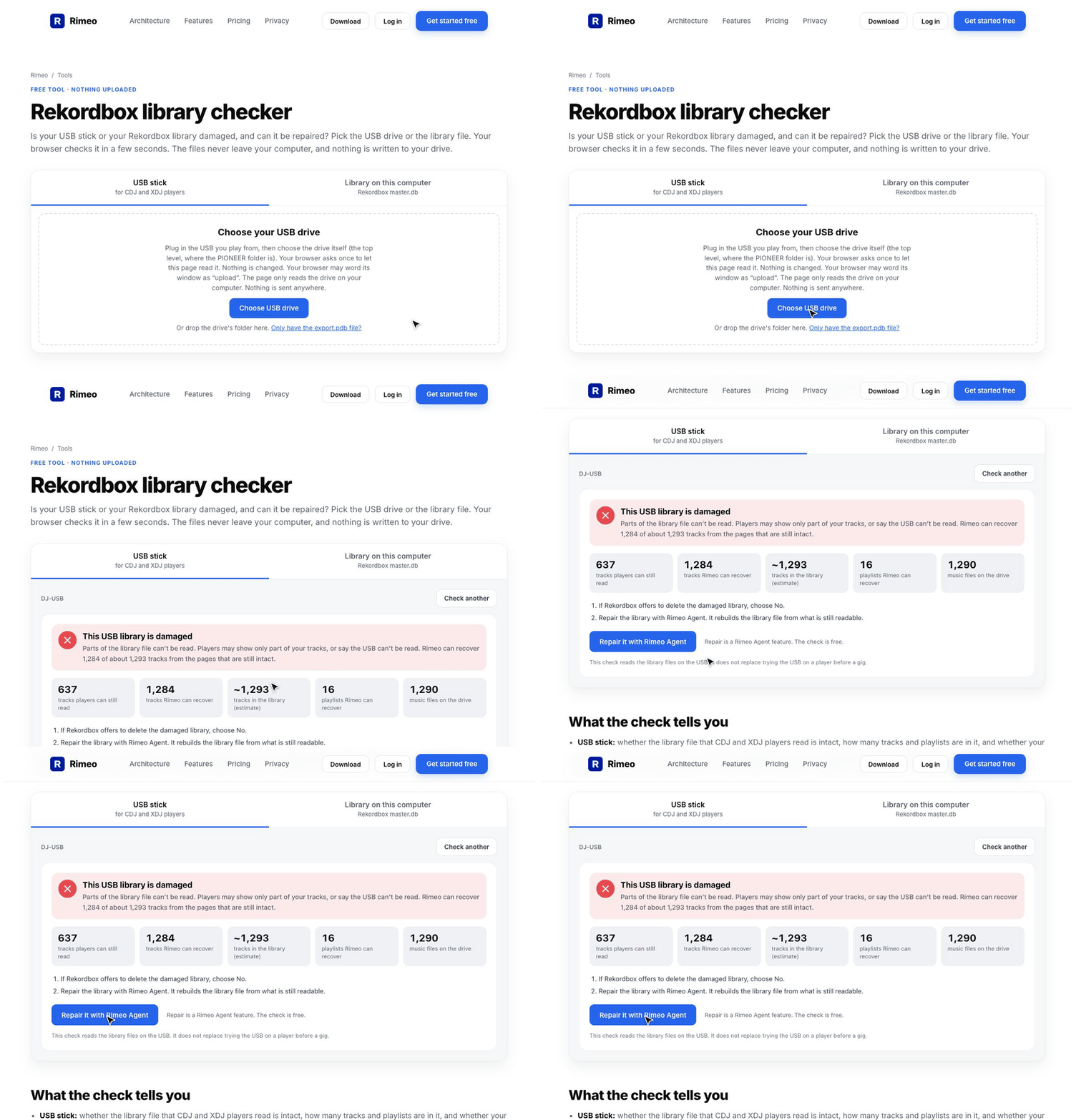
Missing or damaged? Find out in a minute
The Rimeo library checker reads your USB in the browser and tells you whether the Rekordbox library on it is there, healthy or damaged, and whether a damaged one can be repaired. Your files stay on your computer.
Six reasons a CDJ finds no Rekordbox library
1. The tracks were copied, not exported
Dragging files onto the stick in Finder or File Explorer puts the music there and nothing else. The player can still play the files from the folder view, but there are no playlists, cues or analysis from Rekordbox. To fix it, open Rekordbox in Export mode and drag your playlists onto the stick under Devices, or right-click a playlist and choose Export Playlist.
2. Your player reads the other library type
Rekordbox can write two libraries to one stick: the classic Device Library and OneLibrary, which used to be called Device Library Plus. The USB Export page lists the CDJ-3000X, CDJ-1500X, OPUS-QUAD, OMNIS-DUO, XDJ-AZ and XDJ-AN as OneLibrary players. The CDJ-3000, CDJ-2000NXS2, XDJ-XZ, XDJ-RX3 and older models read the Device Library.
The OneLibrary FAQ describes this exact case: a stick that works on other players shows nothing on a CDJ-3000X, because "The CDJ-3000X can browse tracks and playlists on a USB storage device only if OneLibrary (formerly Device Library Plus) has been exported to that device." In Rekordbox, under Devices, right-click OneLibrary on your stick and choose Convert from Device Library. Be careful if the stick already has a OneLibrary: converting overwrites it, and playlists or histories that exist only there are lost. Our Rekordbox export guide walks through both library types in detail.
3. The stick came out before the library was written
The Rekordbox manual says a stick "must not be disconnected while the data is transferring" and asks you to click the remove button next to the device before you disconnect it. It adds that for some DJ equipment a separate library for that equipment is created on the stick when you remove it. Pull the stick out early and the music may be there while the library is incomplete or missing. Export again, wait for the progress bar to finish, then eject the stick with the button next to it in Rekordbox.
4. The library is on the wrong partition
If a stick has more than one partition, the CDJ-2000NXS2 and XDJ-AZ manuals say only the first one can be used, and a partition that holds Rekordbox library information gets priority. A drive split into several partitions can hide your library from the player. The simple fix is one partition per stick for DJ use.
5. The PIONEER folder was deleted or the stick was formatted
Hidden folders are easy to delete by accident when you clean up a drive, and formatting removes everything. The OneLibrary export guide is clear that formatting "will erase all data, including non-rekordbox files." In both cases the only fix is a new export from Rekordbox.
6. The library is there but damaged
If the PIONEER folder and export.pdb are on the stick but the player still can't read them, the library file itself is probably damaged. That usually shows up as 0 tracks or missing playlists, which this walkthrough covers step by step. Copy the PIONEER folder to your computer before you do anything else, then read our guide to a corrupted device library for the ways to export again, restore or repair it.
If the CDJ doesn't see the stick at all
A missing library and a stick the player can't mount are two different problems. When nothing appears at all, the usual suspects are the file system, a hub, the power of the USB port and a second partition. The Rekordbox FAQ names the first one directly: the device "may be formatted in a file system that is not supported by the DJ equipment". The checks go in a set order, at the booth and at home, in what to check when a CDJ is not reading your USB.
A safe order before the gig
- Open the stick on your computer and look for the PIONEER folder.
- Check on the USB Export page which library type your player reads.
- Export your playlists from Rekordbox, wait for the progress bar, then eject the stick in Rekordbox.
- Under Devices, open the stick's OneLibrary or Device Library in Rekordbox and check that your playlists are there. The OneLibrary FAQ suggests exactly this check before you go to a CDJ-3000X.
- Copy the PIONEER folder to your computer with the date in the name.
- If you can, load the stick on a player and play a track.
Know what is on the stick before you reach the booth
A missing library is easy to fix at home and hard to fix five minutes before your set. The players can only show what Rekordbox wrote to the stick, so a quick check after every export saves the scramble. If the library on the stick is damaged rather than missing, the playlists on it may exist nowhere else, which is why a copy of the PIONEER folder matters.
Know the stick will load before you leave home
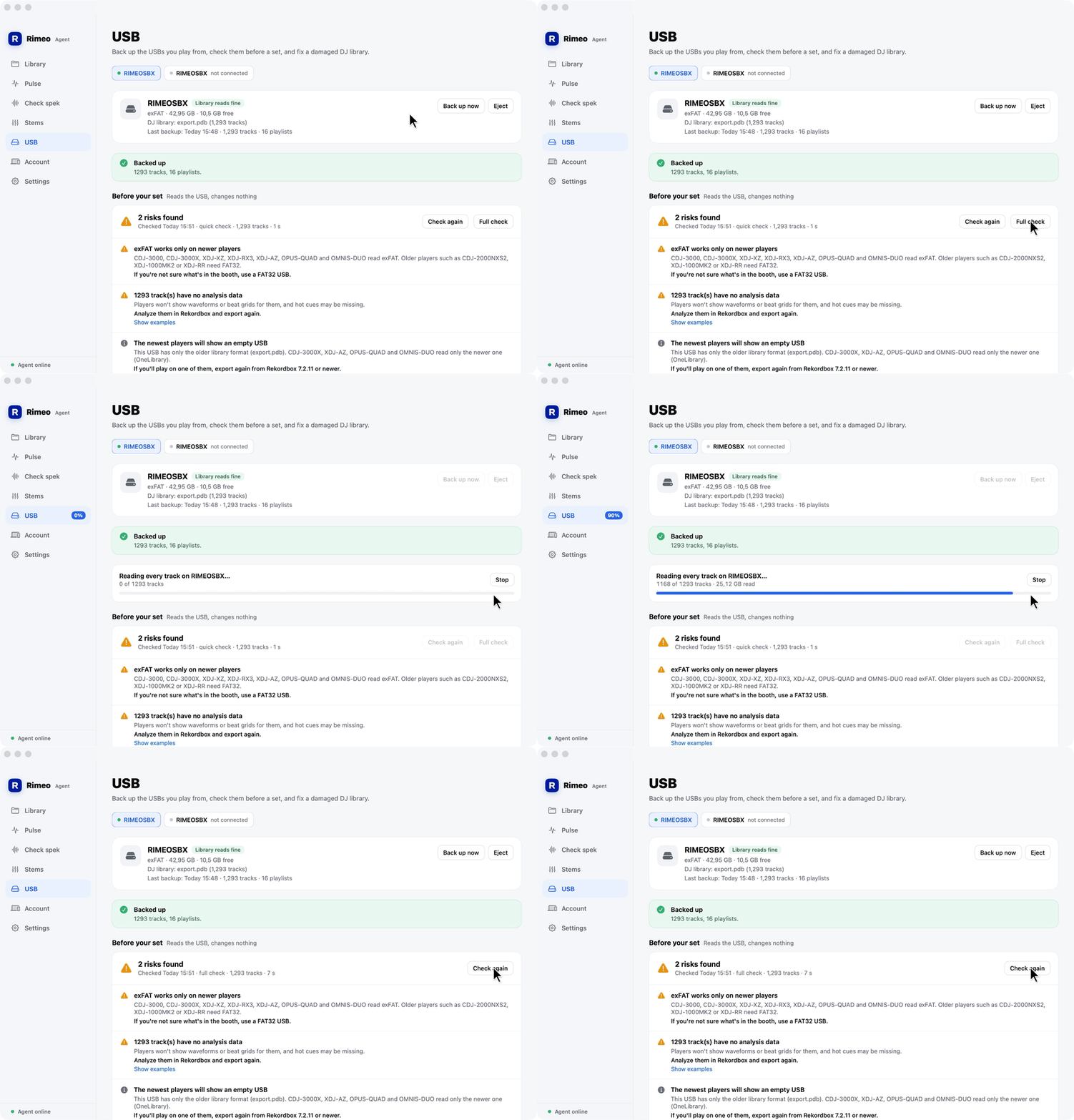
Rimeo Agent on your Mac or Windows PC checks a USB before your set: the library files, the music and the format, without changing anything on the stick. It also backs up every stick you play from. If a library is damaged, it can repair it and shows what comes back before it writes anything.
Sources
FAQ
What does "rekordbox database not found" mean on a CDJ?
The player looked for a Rekordbox library on the USB and found none it can read. The music files may be there, but the library Rekordbox writes when you export is missing, damaged, on another partition or of a type the player doesn't read.
Why does my CDJ show folders instead of my playlists?
The CDJ-3000 and CDJ-3000X manuals say that a storage device without a Rekordbox library is shown as folders and tracks in a hierarchical structure. Export the stick from Rekordbox, or export OneLibrary if your player reads only OneLibrary.
Can I copy music to a USB without Rekordbox and still see playlists?
No. The player can play the files from the folder view, but playlists, cues and analysis come from the library information Rekordbox writes to the stick when you export.
My USB has two partitions. Which one does the CDJ read?
The CDJ-2000NXS2 and XDJ-AZ manuals say only the first partition can be used, and a partition with Rekordbox library information gets priority. One partition per stick avoids the problem.