Rekordbox Library Corrupted? How to Recover master.db
Rekordbox won't open or your playlists are gone? Your master.db is likely damaged. Recover it by hand from a backup, or repair it automatically with Rimeo.

Rekordbox won't open. Or it opens with an empty collection, or half of your playlists are gone. In most cases the library database on your computer, master.db, is damaged, while your music files are fine. Years of playlists and cue points live in that one file, so the first rule is simple: don't make it worse.

Want your DJ library on your phone?
Rimeo streams your whole Rekordbox DJ library from your own computer to your iPhone or any browser. Nothing gets uploaded.
The short answer
There are two ways to recover a damaged master.db:
- By hand: put back one of Rekordbox's own backup copies. It works when a backup is recent, but everything you changed after that date is lost.
- Automatically (recommended): Rimeo Agent rebuilds the library from everything that can still be read, and shows you the result before it changes anything.
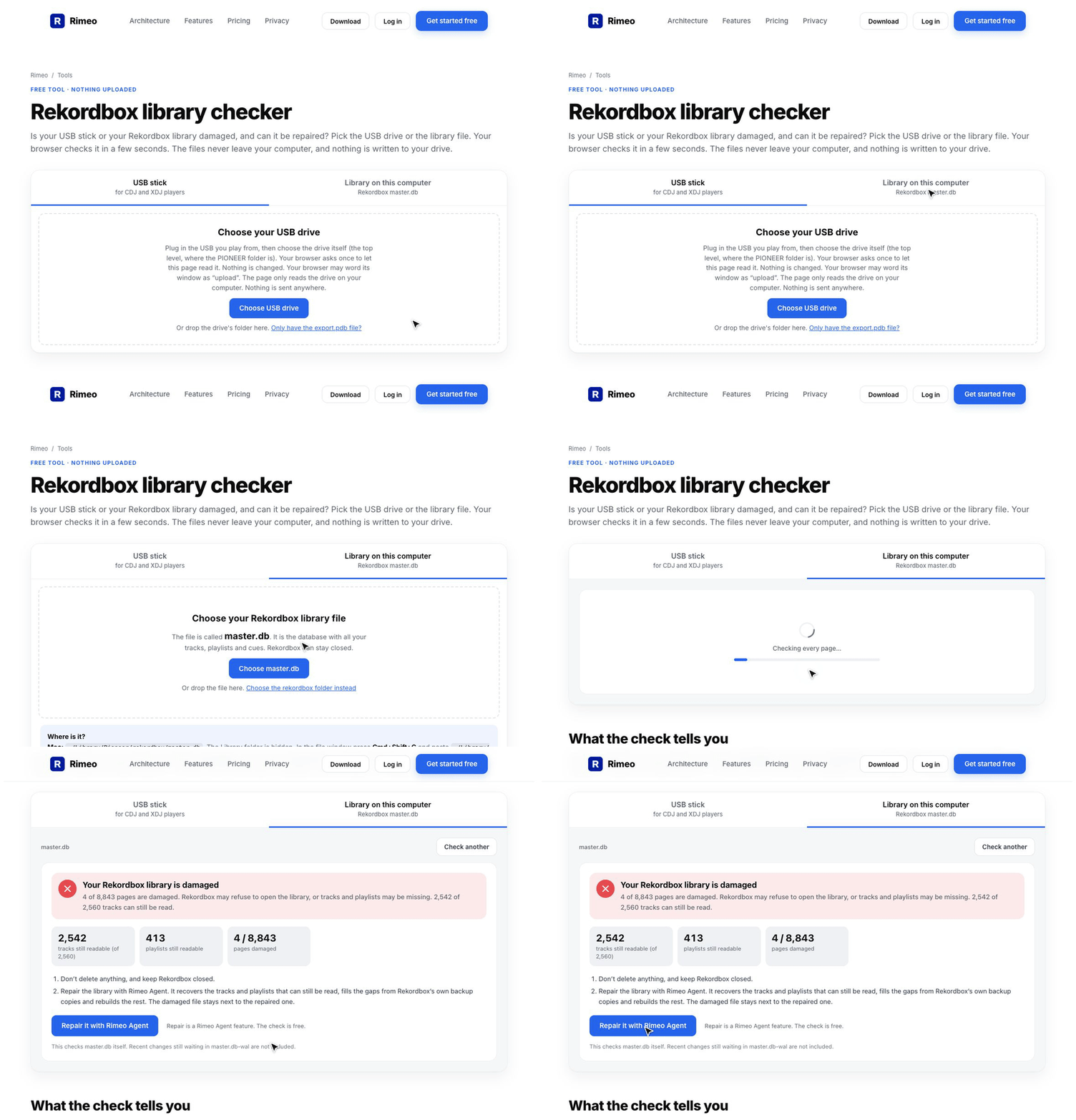
Not sure the file is damaged? The Rekordbox library checker reads your master.db in the browser and tells you. Nothing is uploaded.
Option 1: Restore master.db by hand
Use this when one of Rekordbox's backups is recent enough.
- Quit Rekordbox. Copy the whole rekordbox folder to an external drive or your desktop. On a Mac it is
~/Library/Pioneer/rekordbox/, on Windows%APPDATA%\Pioneer\rekordbox\. This copy is your way back. - In that folder, look at the dates of
master.backup.db,master.backup2.dbandmaster.backup3.db. These are Rekordbox's automatic copies. Pick the newest one from before the problem started. - Move
master.dbinto a new folder namedold, together withmaster.db-walandmaster.db-shmif you see them. Copy the backup you picked and rename the copy tomaster.db. - Open Rekordbox and check your playlists. Tracks, cues and playlist changes made after the backup date are missing, so import and fix them again.
If you made a library backup with File > Library > Backup Library, you can restore it with File > Library > Restore Library instead of steps 3 and 4.
If no backup is good, the last manual option is a fresh library: start with an empty collection and import your music again. Playlists, cues and history made in Rekordbox are gone.
Option 2 (recommended): Automatic repair with Rimeo
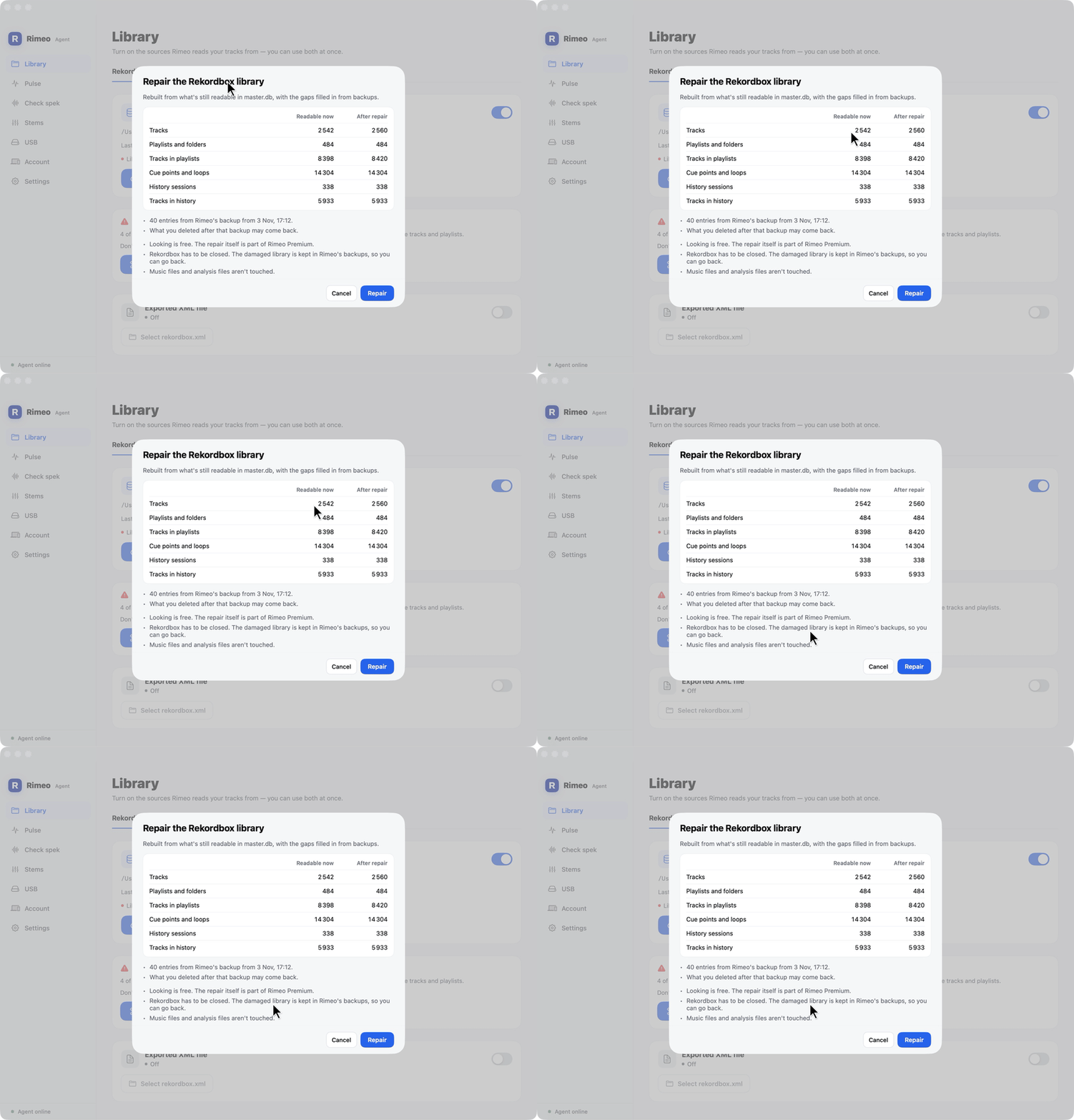
Rimeo Agent is a desktop app for Mac and Windows. Its repair does the careful part of Option 1 for you, and it goes further than one backup copy:
- It reads everything that is still readable in the damaged
master.db: tracks, playlists, cue points and history. - It fills the gaps from Rekordbox's three backup copies, your analysis files and
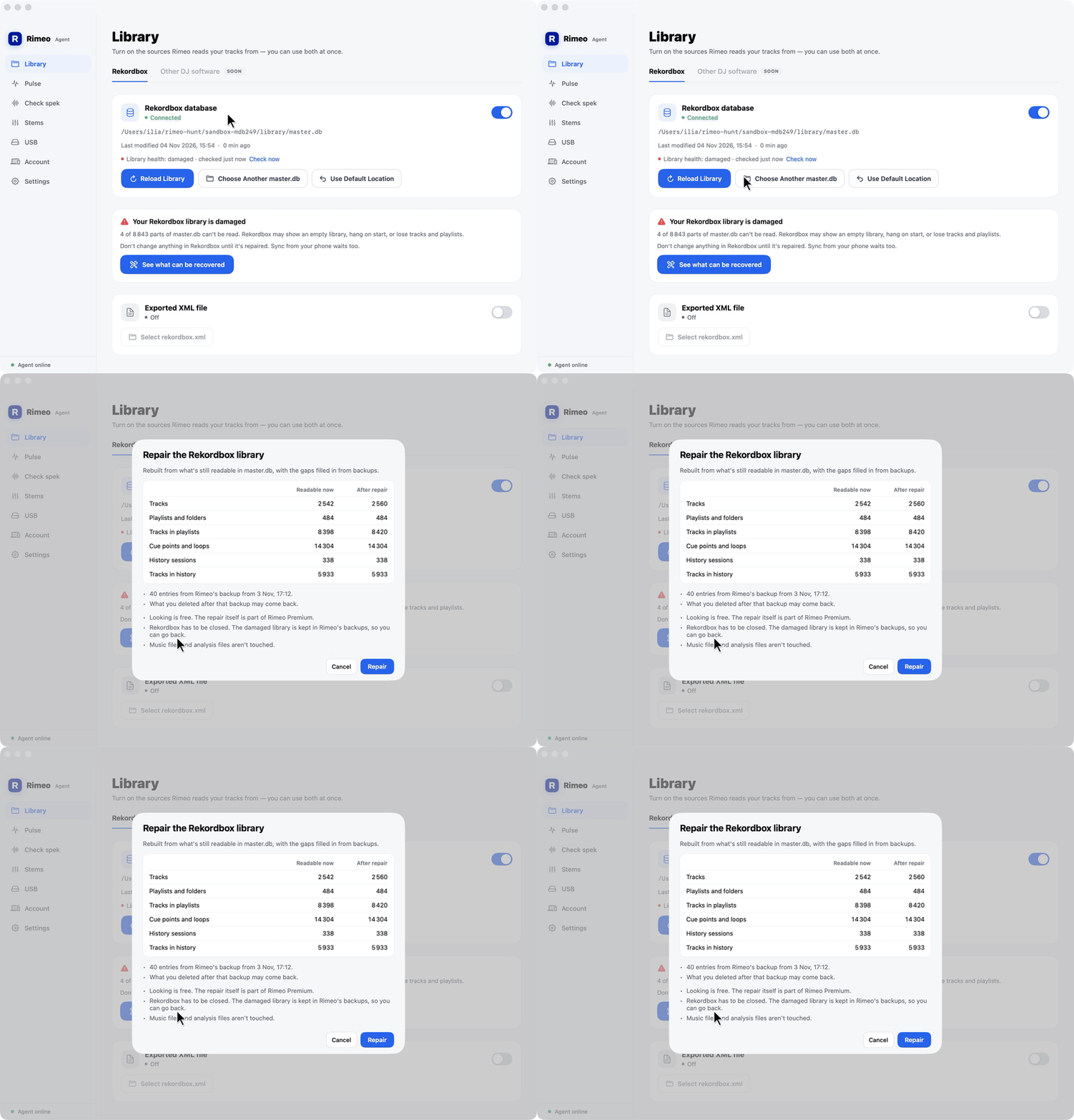
masterPlaylists6.xml. - It shows what will come back before it changes anything.
- It keeps the damaged file in its own backups, so you can always go back.
Open Rimeo Agent, go to the Library tab and click See what can be recovered. Check the numbers, close Rekordbox and click Repair. Rimeo puts the rebuilt library in place and checks it.
The repair is part of Rimeo Premium. It brings back what can still be read, so a badly damaged file may not come back in full.
By hand vs Rimeo
| By hand (backup copy or fresh library) | Rimeo (automatic repair) | |
|---|---|---|
| What you lose | Everything after the backup date. A fresh library loses all playlists, cues and history. | Only what can't be read anywhere. Tracks, playlists and cues are rebuilt from the file and Rekordbox's backups. |
| Time | Minutes to restore, then hours to redo recent work or import everything again. | Usually a few minutes, with no new import. |
| Shows what comes back first | No. | Yes. |
| Keeps the damaged file | Only if you copied it yourself. | Yes, always. |
| Rekordbox closed | Yes. | Yes. |
Next time
Once Rekordbox works again, keep a copy of the rekordbox folder outside the computer, at least before big imports and before you travel. Rimeo Agent also copies master.db by itself: before and after each Sync, and when you close Rekordbox. If you play from USB sticks, see How to Check and Back Up Your Rekordbox USB Before a Gig.
Want to know how bad it is first? The checker reads your master.db in the browser. Nothing leaves your computer.
FAQ
Where is the Rekordbox master.db file?
On a Mac it is in ~/Library/Pioneer/rekordbox/. On Windows it is in %APPDATA%\\Pioneer\\rekordbox\\. Rekordbox keeps automatic copies next to it, named master.backup.db, master.backup2.db and master.backup3.db.
Can I restore Rekordbox from a backup without losing recent work?
Not fully. Rekordbox's backup copies are from earlier points in time, so changes after that are missing. Rimeo's repair reads the damaged file itself, so recent work that can still be read comes back.
What does Rimeo recover from a damaged master.db?
Tracks, playlists, cue points and history that can still be read. It fills gaps from Rekordbox's backup copies, your analysis files and masterPlaylists6.xml, and shows what will come back before it replaces anything.
Does Rimeo guarantee a full recovery?
No. It restores what can still be read, and how much that is depends on how badly the file is damaged.